

OpenInk Studio · Updated
Tattoo Deposit Software: Take Deposits Online
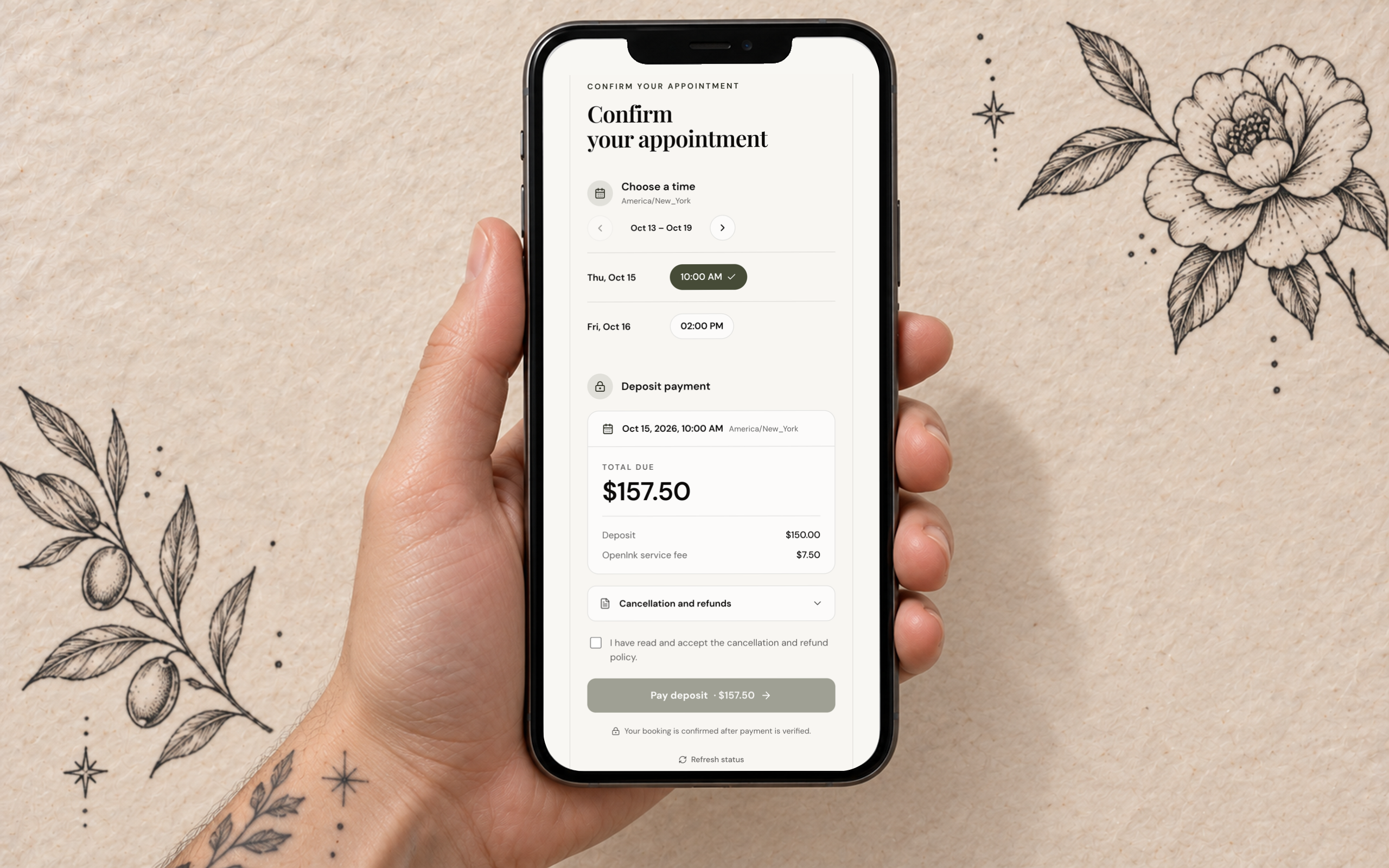
In OpenInk Studio the deposit is part of the booking link. You offer a few times, set the deposit and save your cancellation rules once; the client picks a time and pays by card, and the money lands in your own Stripe account. Nothing is held on your calendar until someone pays, so there are no screenshots to check and no dates kept open for clients who go quiet.
- of the session price, or a fixed amount
- 1–100%
- for the client to pick a time and pay
- 12 h–7 days
- of the deposit reaches your Stripe account
- 100%
- countries and regions where deposits work
- 33
How a deposit link works
From an inquiry, enter the price and length of the session and add the times you can do. Send the link. The client opens it on their phone, chooses one of your times, accepts your rules and pays. Whoever pays first gets the slot; until then your calendar stays open. Leave the times out and the client picks from the weekly hours you've saved.
- The link stays open for 12, 24, 48 or 72 hours, or 7 days.
- Tick the box and we email it to the client. You can also copy it into Instagram or WhatsApp.
- It opens in the language the client used on your form, and they can switch at the top.
- Once the deposit is paid, you both get a confirmation and the session is on your calendar.
A percentage or a fixed amount
Save a default once, anywhere from 1% to 100% of the session price. On each link you can keep it, type a different percentage or enter a fixed amount, up to the price of the session. The deposit comes off the final price, and the client's terms say so. On the Free plan every link takes a deposit, though once a client has paid you one through OpenInk, their later sessions can go without. With a membership you can send any link without a deposit.
Cancellation, no-show and rescheduling rules
Before the first link goes out, you save your booking rules as a handful of numbers. The client reads them, written out in full, before paying, and each link keeps the rules that applied when you created it. Change them later and only new links pick up the new version. When the studio cancels, the client gets the deposit and the service fee back in full.
- How many hours' notice you need
- The share of the deposit that comes back for a cancellation before that point, and for one after it
- What comes back after a no-show
- Whether a booking can move, up to how many times (1–10), and whether a late move is refused or needs a new deposit
- Whether the service fee is refunded at the same rate as the deposit or not at all
What happens to a $150 deposit
The rules in this example: 72 hours' notice, the full deposit back before that, half after it, nothing for a no-show, and the service fee isn't refunded. The client paid $150 plus a $7.50 service fee, the 5% rate on a paid plan.
| What happens | Back to the client | Yours to keep |
|---|---|---|
| Cancels five days before | $150 | $0 |
| Cancels the day before | $75 | $75 |
| Doesn't show up | $0 | $150 |
| You cancel | $157.50, service fee included | $0 |
Illustration only. Refunds go back to the card the client paid with. On the Free plan the service fee in this example would be $15.
A deposit policy you can copy
Use it in your highlights, on your website or in a DM before you send the link. Change the parts in brackets to match your own rules. Consumer law on deposits differs from country to country, so check what applies where you work before you publish it.
Deposit policy

A deposit of [30%] of the session price books your appointment. It comes off the final price.

Cancel at least [72 hours] before your appointment and the full deposit comes back.

Cancel later than that and [half] of the deposit comes back.

If you don't turn up, the deposit isn't refunded.

You can move your appointment [once], with at least [72 hours'] notice. After that, a new date needs a new deposit.

If we have to cancel, you get back everything you paid.
Paid into your own Stripe account
Connect a Stripe account once in the workspace and every deposit goes straight into it. OpenInk never holds the money, and Stripe pays it out to your bank on your account's schedule. The deposit currency has to match the one your Stripe account pays out in; you choose it once under Payments. Deposits work in 33 countries and regions, including the US, Canada, the UK, most of the EU, Australia, New Zealand, Japan, Hong Kong and Singapore.
What the client pays on top
A platform service fee, shown as its own line before they pay: 10% of the deposit on the Free plan, 5% on a paid plan or during the trial (7% for Stripe accounts in Thailand). Each payment has a minimum of US$3.99 on Free and US$2.50 on paid plans, rounded to a familiar price in other currencies. Your deposit arrives in full, and OpenInk pays the Stripe processing fee.
The balance after the session
When the work is done, send the balance through the same booking link and the client pays it by card at the same service-fee rate. If they pay at the counter in cash or on your own card machine, record it instead; that costs nothing. Either way it shows up on your Income page next to the deposit.
What it doesn't do
Clients pay the deposit in one go by card. There are no instalments, no buy-now-pay-later, no tips and no card terminal for the counter. If you rely on one of those, keep the tool you use for it and take deposits here.
Related resources
Try this workflow in OpenInk Studio
Sign up and start today. New accounts get 14 days of full access, then you can stay on Free or choose a paid plan.
Start free